
If your power wheelchair battery isn’t holding a charge, you’re facing more than an inconvenience—you’re dealing with a potential mobility emergency. Sudden power loss, failed charging cycles, or rapidly dropping battery indicators can leave you stranded, disrupt essential routines, and compromise safety. The good news? Most charging issues aren’t permanent, and many can be diagnosed and fixed at home—without costly repairs or service calls.
This guide cuts through the confusion with a clear, step-by-step approach to diagnosing why your wheelchair battery won’t hold a charge. Whether you use a Meyra MC1, Quickie Pulse 6, or another model, you’ll learn how to test your charger, inspect connections, measure battery health, and decide when replacement is truly needed. From jump-starting a dead battery to preventing future failures, this is your complete action plan to restore power and stay independent.
Test the Charger Before Replacing the Battery
Many users replace batteries unnecessarily—only to discover the real culprit was a faulty charger. Always start here, as charger issues mimic battery failure almost perfectly.
Read Charger Light Patterns Like a Pro
Your charger’s indicator lights reveal its status:
– Green only when plugged in (no red phase): The charger may be receiving power but not delivering it—common with internal faults.
– No lights at all: No power input, blown fuse, or dead charger.
– Red or blinking light: Charging is active—this is normal behavior.
– Flickering when wiggling the plug: Points to a damaged port or loose internal wiring.
Pro Tip: If the charger turns green immediately—without ever showing red—it’s likely not charging. This could mean the battery voltage is too low for the charger to recognize, or the charger itself is defective.
Use a Multimeter to Confirm Charger Output

Don’t guess—test. A multimeter gives you hard data:
1. Set to DC volts.
2. Insert probes into the charger’s output plug (red to positive, black to negative).
3. Plug the charger into the wall.
4. Check the reading.
For a 24V wheelchair system, expect 26–29V.
Below 24V or zero? The charger is failing and should be replaced.
Warning: Always test the wall outlet first with a lamp or phone charger. A dead outlet can fool you into thinking the charger is broken.
Try a Known-Good Charger
If possible, test your battery with a working charger from a friend, caregiver, or dealer. If it charges successfully, your original charger is the problem.
Ensure compatibility:
– Match voltage (24V, 36V, etc.).
– Confirm amperage (e.g., 4A or 5A).
– Verify connector type and polarity (tip positive vs. negative).
Expert Note: Smart chargers are ideal—they automatically stop charging when full, reducing stress on batteries and extending lifespan.
Inspect and Clean Battery Connections
Loose or corroded connections are silent killers—they block power flow and cause charging failures, even with healthy batteries.
Remove Corrosion from Terminals Safely
Sealed lead-acid (SLA) batteries often develop white or greenish crust on terminals:
1. Turn off and disconnect the wheelchair.
2. Access the battery terminals.
3. Mix 1 tablespoon baking soda with 1 cup water.
4. Dip a cloth or toothbrush and scrub the terminals.
5. Wipe clean and dry thoroughly.
6. Reconnect tightly.
Safety First: Wear gloves and eye protection. SLA batteries can leak sulfuric acid, which causes skin burns.
Secure All Wiring and Plugs
Check:
– Battery terminal posts (shouldn’t wobble).
– Wiring harness under the seat.
– Charging port on the frame.
Reseat every connector firmly. If a plug feels loose or damaged, replace it or consult a technician.
User Case: An M3 wheelchair resumed charging after reseating a loose battery terminal—no parts replaced.
Measure Battery Voltage to Assess Health
Voltage testing tells you if your battery is weak, dead, or just deeply discharged.
Check Fully Charged Voltage
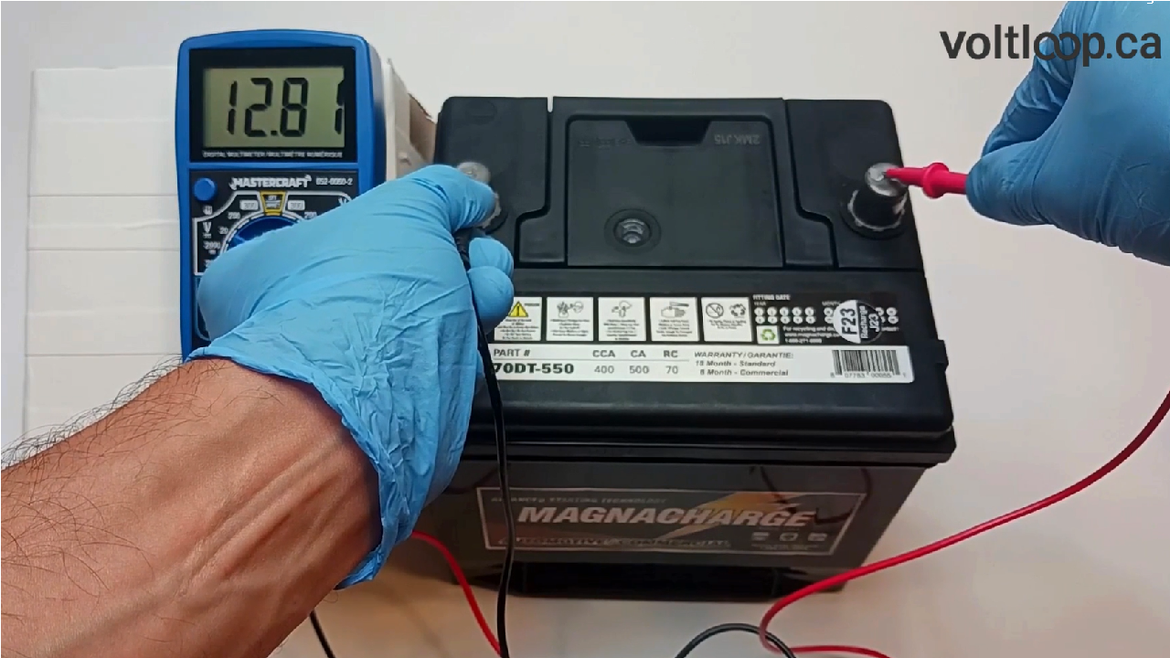
After 8+ hours of charging:
– Single 12V battery: Should read 12.6–12.8V.
– 24V system (two batteries): Should read 25.2–25.6V.
Use a multimeter:
1. Turn off the wheelchair.
2. Touch red probe to positive, black to negative.
3. Record the reading.
If a 12V battery reads below 12V, it may have a dead cell or be permanently damaged.
Perform a Load Test to Catch Hidden Failures
A battery can show good voltage at rest but fail under load:
1. Turn on the lights or move the joystick slightly.
2. Watch the voltage.
3. If it plummets (e.g., from 12.5V to 10V), the battery is weak or failing.
Key Insight: Sudden shutdowns despite a “full” indicator often mean one dead cell in a battery pack.
Diagnose Battery Age and Physical Damage
All batteries wear out. Knowing your battery’s age helps determine if replacement is overdue.
Compare SLA vs Lithium-Ion Lifespan
| Battery Type | Lifespan | Warning Signs |
|---|---|---|
| SLA (Lead-Acid) | 1–2 years | Reduced runtime, swelling, leakage |
| Lithium-Ion | 3–5 years | Rapid discharge, overheating |
If your SLA battery is over 18 months old and performance has declined, replacement is likely needed.
Red Flag: A 6-month-old battery with poor performance may be defective—check warranty before buying new.
Look for Dangerous Physical Signs
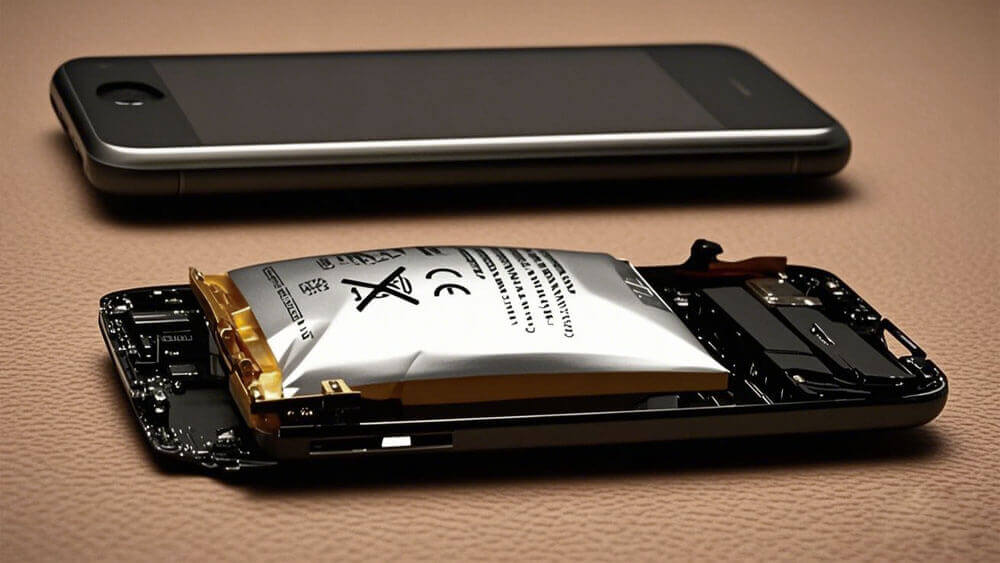
Inspect for:
– Swelling or bulging (especially in Li-ion).
– Leaking fluid (SLA only—corrosive and hazardous).
– Overheating during charging or use.
Any of these? Replace immediately.
Warning: Leaking SLA batteries have caused acid burns—handle with gloves and dispose of properly.
Rule Out Fuse and Controller Problems
Sometimes the issue is in the wheelchair’s electronics, not the battery.
Check the Main Fuse
Most wheelchairs have a 30A fuse near the battery or controller:
1. Locate it (check your manual).
2. Remove and inspect—look for a broken filament.
3. Replace with the same rating.
Common Fix: A blown fuse can mimic a dead battery—replacing it restores power instantly.
Inspect Wiring and Controller
Look for:
– Frayed, pinched, or chewed wires.
– Burnt smell near the controller.
– Loose harness under the seat.
If you see damage or smell burning, stop using the chair and see a technician.
Case Example: A wheelchair charged fully but died on startup—diagnosed as failed thermal cutoff from overheating.
Fix False Battery Readings and Gauge Errors
Sometimes the battery is fine—the display is lying.
Recognize BMS or Sensor Malfunctions
Symptoms:
– Battery drops from 3 bars to red in seconds.
– Turning the chair off and on resets the display to full.
– Runtime doesn’t match the indicator.
This suggests BMS drift or a dead cell, not actual charge loss.
Recalibrate the Battery Gauge
To reset the system:
1. Use the wheelchair until it stops (fully discharge).
2. Charge continuously for 12–18 hours with a smart charger.
3. Avoid interruptions.
Some systems auto-calibrate after this cycle.
User Report: A Quickie Pulse 6 user regained accurate readings after recalibration—no hardware changed.
Replace the Battery When Necessary
If testing confirms failure, replacement is your only option.
Choose the Right Replacement Battery
Match:
– Voltage (e.g., 24V).
– Amp-hour (Ah)—higher Ah = longer runtime.
– Dimensions (e.g., 215×215×83 mm).
– Chemistry (SLA or Li-ion).
Recommended:
– Weize 12V 35Ah – reliable aftermarket SLA.
– OEM batteries from Permobil, Meyra, or Quickie – best compatibility.
Pro Tip: Replace both batteries together—even if one seems fine. Mixing old and new reduces performance and lifespan.
Check Warranty Before Paying
Most batteries have 6–12 month warranties. If your battery failed early (e.g., at 6 months), you may qualify for a free replacement.
User Concern: Replacement costs $200–$600—warranty check could save hundreds.
Jump-Start a Deeply Discharged Battery
A battery drained too low may not register with the charger. Revive it with a jump-start.
Use a Car Battery (SLA Only)
- Turn off the wheelchair.
- Connect jumper cables:
– Red to battery positive.
– Black to negative. - Attach to a 12V car battery.
- Wait 5–10 minutes.
- Disconnect.
- Plug in the wheelchair charger.
Caution: Never jump-start lithium-ion batteries—risk of fire or damage.
Success Case: One user revived a “dead” battery after 18 hours of deep discharge—no replacement needed.
Prevent Future Charging Failures
Smart habits extend battery life and prevent breakdowns.
Optimize Charging Habits
| Do This | Avoid This | Why |
|---|---|---|
| Charge at 20–50% | Drain to 0% | Prevents sulfation in SLA |
| Use a smart charger | Leave on overnight | Prevents overcharging |
| Store at 50–80% charge | Store fully drained | Prevents deep discharge damage |
| Charge in cool, dry place | Charge in sun or cold | Extreme temps damage cells |
Controversy: Some users swear by monthly full discharge/charge cycles. Experts say this stresses SLA—do sparingly.
Control Environmental Risks
- Charge between 10°C–30°C (50°F–86°F).
- Never cover the charger or battery while charging.
- If unused for weeks, charge every 3–4 weeks.
Real-World Risk: High heat triggers thermal cutoffs—users reported power loss after leaving chairs in hot cars.
When to See a Technician
Some issues require professional help.
Seek Expert Help If:
- Blown fuse replaced but no power.
- Wiring or controller damaged.
- Battery or charger shows swelling, sparks, or smell.
- BMS or software reset is needed.
- Warranty service is available.
Final Advice: Authorized service centers prevent voided warranties and ensure safe repairs.
Final Note: A wheelchair battery not holding charge is more than a technical glitch—it’s a threat to independence. But with this guide, you can often diagnose and fix the problem in under an hour. Start with the charger, inspect connections, test voltage, and only replace parts when necessary. Track performance monthly, charge wisely, and replace SLA batteries every 1–2 years. With the right knowledge, you’ll stay mobile, safe, and in control.