
Is your electric wheelchair unresponsive, pulling to one side, or dying mid-day? You’re not alone. Electric wheelchair troubleshooting is a vital skill for users, caregivers, and technicians—especially when mobility depends on a quick fix. Most problems aren’t catastrophic; they stem from simple causes like loose wires, dead batteries, or tripped breakers. In fact, over 70% of power and performance issues can be diagnosed at home with basic tools and 10 minutes of effort.
This guide walks you through every common malfunction using proven diagnostics from manufacturers and service technicians. You’ll learn how to reset systems, test voltage, clean connections, and spot early warning signs before they become major breakdowns. Whether you use a Jazzy, Quickie Pulse 6, Drive Phoenix, or Glide Centro, these universal troubleshooting steps apply across brands. Let’s get your chair rolling again—and keep it running longer.
No Power? Check These First
If your electric wheelchair won’t turn on, don’t assume the battery or motor is dead. Start with the most common, easily fixable causes.
Confirm Charging & Outlet Function
Plug in the charger and watch the indicator light. A red or amber light means charging; green typically indicates full charge. If no light appears:
– Test the wall outlet with another device (like a phone charger).
– Try a different outlet to rule out electrical issues.
– Ensure the charger is fully inserted into both the wall and the chair’s charging port.
Even if lights suggest a full charge, leave the chair plugged in for 8–12 hours (lithium) or 10–14 hours (lead-acid). Surface charges can deceive indicators, leaving batteries underpowered.
Pro Tip: If the charger gets hot quickly or flickers, it may be failing—test output with a multimeter or replace it.
Inspect Battery Connections
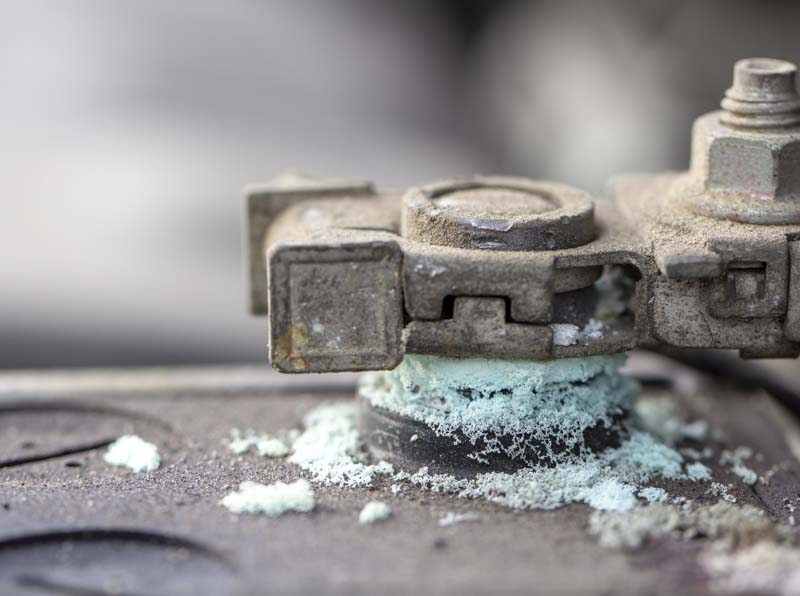
Access the battery compartment—usually under the seat or rear shroud. Check for:
– Loose connectors that haven’t clicked securely into place.
– Corrosion (white or green crust) on terminals.
To clean corrosion, mix one tablespoon of baking soda with water, apply with a toothbrush, scrub gently, then dry thoroughly. Reconnect terminals firmly until you hear a click.
Reset the Circuit Breaker
Locate the red or black reset button near the battery housing on the base. Press and hold for 3–5 seconds. It should click back into place. This often restores power after an overload or bump.
Some battery packs also have their own internal reset—press it if the chair died suddenly after hitting a curb.
Rule Out Manual Override Disengagement
On dual-motor models (like Jazzy or Drive Phoenix), manually pushing the chair disengages the motors. Before assuming electronic failure, check that both motor release levers are re-engaged. A single disengaged side mimics total power loss.
Intermittent Operation: Why Your Chair Shuts Down
If your wheelchair powers on but stops after a few minutes, the issue is likely intermittent power delivery, not a terminal failure.
Test for Battery Pack Reset
A hard jolt can trip internal safety circuits. After shutdown:
– Turn the chair off.
– Wait 30 seconds.
– Power back on.
This often resets the system. If it works, suspect loose wiring or aging batteries.
Check for Loose Wiring
Vibration loosens connectors over time. Focus on:
– Joystick-to-controller cable.
– Battery harness.
– Power switch leads.
Unplug and reseat each connector. Wiggle cables while powered—if the chair cuts out, you’ve found a faulty connection.
Rule Out Overheating
Running uphill or at top speed heats motors and controllers. Thermal protection shuts them down until cooled. Signs:
– Chair restarts after 30–60 minutes.
– Motor casing feels hot.
Solution: Operate at lower speeds, avoid steep inclines, and allow cooldown periods.
Reduced Speed or Stalling? Diagnose Now

Struggling to climb ramps or slowing unexpectedly? The problem may be insufficient power or mechanical resistance.
Verify Battery Charge Level
Even if the gauge shows “half,” weak cells may not sustain load. Fully charge, then test voltage with a multimeter:
– 12V battery: Should read 12.6–13.8V when full.
– 24V system (two batteries): Aim for 25.2–27.6V.
Replace both batteries if voltage is below 80% of rated capacity after charging.
Assess Tire Condition and Pressure
Underinflated tires increase drag. For pneumatic tires:
– Check pressure weekly with a bike gauge.
– Inflate to manufacturer’s PSI (usually 30–50 psi).
– Inspect for punctures, flat spots, or uneven wear.
Warning: Riding on flat tires strains motors and shortens battery life.
Avoid Weight Overload
Most chairs support 250–330 lbs. Exceeding this limit strains motors and accelerates wear. Check your model’s limit and adjust cargo or seating if necessary.
Joystick Not Responding? Fix It in Minutes
An unresponsive or erratic joystick is frustrating—but often simple to fix.
Reconnect the Joystick Cable
Power off the chair. Unplug the joystick cable at both ends (joystick base and controller). Reseat firmly. Many issues stem from a partially disconnected plug.
Visual cue: Look for alignment marks or locking tabs to ensure full insertion.
Clean Around the Base
Dust, crumbs, or spills interfere with sensors. Use a dry cloth or slightly dampened wipe to clean around the joystick. Never spray liquid directly.
Recalibrate the Joystick
Over time, the neutral point drifts, causing unintended movement. To recalibrate:
– Power off for 30 seconds.
– Power on, then center the joystick.
– Hold forward or reset button (per manual) for 5–10 seconds.
Refer to your model’s manual—Glide Centro and Quickie Pulse 6 have unique calibration steps.
Decode Beep Patterns
Some chairs signal faults with beeps:
– Four beeps: Often means joystick fault, motor disengaged, or charger still plugged in.
– Continuous beeping: Low battery or system lock.
Unplug charger and restart. If beeping persists, recalibrate or replace.
Wheelchair Pulls to One Side? Balance It Fast

Pulling left or right is unsafe on slopes. The fix usually lies in tires, motors, or calibration.
Match Tire Pressure
Use a pressure gauge to check both pneumatic tires. Even a 10 psi difference causes pulling. Inflate to spec and retest.
Inspect for Tire Damage
Look for:
– Uneven tread wear.
– Flat spots from sitting too long.
– Punctures or bulges.
Replace damaged tires immediately.
Test Motor Symmetry
Lift rear wheels off the ground. Use the joystick to move forward slowly. Watch both wheels:
– Does one turn slower?
– Does one hesitate or not move?
If yes, that motor or its wiring may be failing.
Recalibrate Joystick Neutral
An off-center joystick biases movement. Follow recalibration steps above. Test on a flat surface after.
Rapid Battery Drain? Stop the Loss
If your battery dies in an hour instead of a day, the culprit could be old cells, poor connections, or parasitic drain.
Test Actual Voltage After Charging

Charge fully, then measure:
– Below 24V on a 24V system? Battery is degraded.
– Voltage drops quickly under load? One or more cells are dead.
Replace both batteries—even if only one seems weak.
Check for Corroded or Loose Terminals
Poor connections increase resistance, wasting power as heat. Clean and tighten all terminals. Apply dielectric grease to prevent future corrosion.
Rule Out Faulty Charger
Use a multimeter to test charger output. Set to DC volts, then measure the plug tip:
– Compare to label (e.g., 24V, 5A).
– If output is low or zero, replace the charger.
Note: Using a non-OEM charger can damage batteries or void warranty.
Investigate Controller or Motor Shorts
If battery and charger test good, but drain persists, suspect a short circuit in the motor or controller drawing power when idle. This requires a technician.
Strange Noises? Find and Fix the Source
Unusual sounds signal trouble. Early detection prevents costly repairs.
Identify the Noise Type
- Clicking: Loose bolt or intermittent wire.
- Grinding: Worn bearing or gear damage.
- Whirring: Debris in drivetrain.
- Squealing: Dry or failing wheel bearing.
Inspect for Debris
Lift wheels and spin by hand. Look for:
– Rocks, gravel, or hair wrapped around axles.
– Fabric caught in motor housing.
Remove carefully with tweezers or pliers.
Lubricate Moving Parts
Use wheelchair-safe lubricant on:
– Wheel bearings.
– Motor shafts.
– Folding mechanisms.
Avoid oil-based sprays near electronics.
Replace Worn Bearings
If grinding persists after cleaning and lubrication, bearings are likely shot. Replacement cost: $50–$100 per wheel.
Control Panel & Lights Not Working?
If display, lights, horn, or signals fail, the issue is usually simple.
Check the Fuse
Most chairs have a fuse near the battery or controller. Locate it (often in-line with red wire), remove, and inspect:
– Blown fuse = broken metal strip.
– Replace with same rating (usually 10–30A).
Inspect for Moisture Damage
Spills or rain kill electronics. Signs:
– Flickering display.
– Intermittent lights.
– Corrosion on circuit boards.
Dry thoroughly and use a waterproof cover outdoors.
Test All Functions Monthly
Run a quick check:
– Horn.
– Headlights.
– Turn signals.
– Battery indicator.
Catches small issues early.
When to Repair vs. Replace
Not every problem justifies repair. Use the 50% rule.
Apply the 50% Rule
If repairs exceed 50% of the chair’s current value, replacement is smarter. Example:
– Needed: Motor ($500), battery ($400), joystick ($250) = $1,150 total.
– Chair resale value: ~$1,500 → Replace.
Consider Upgrading
New models like the Malisa MLS-10 offer:
– 30-mile range.
– 330 lb capacity.
– Lightweight aerospace alloy frame.
– 3-year warranty.
Often priced near high-end repair bills.
Preventative Maintenance Schedule
Avoid breakdowns with simple, regular care.
Daily Checks
- Confirm battery level.
- Test joystick response.
- Scan for loose parts or damage.
Weekly Tasks
- Check tire pressure (pneumatic only).
- Clean joystick and controls.
- Inspect battery connections.
Monthly Maintenance
- Tighten all visible screws.
- Lubricate bearings and joints.
- Test lights, horn, and display.
- Deep clean undercarriage.
Storage Tips
- Store indoors, away from moisture.
- Charge batteries at least once a month if unused.
- Never leave on concrete floors—promotes corrosion.
When to Call a Technician
Some issues demand professional help.
Seek Expert Help If:
- Circuit breaker trips repeatedly.
- Motor makes grinding noise under load.
- Controller shows error codes.
- Frame or axle is bent.
- Warranty-covered part needs replacement.
Trusted Service Providers
- All-Star Medical (TN): 615-730-9438 | AllStarMedicalLLC.com
- Prairie State Rehab: Contact@prairiestaterehab.com
- Active Mobility Technical Services: For Glide Centro and similar models
Tip: Always provide model and serial number when requesting support.
Final Tips for Long-Term Reliability
Your electric wheelchair is a lifeline—treat it like one.
- Charge nightly, even if unused.
- Use only OEM or compatible chargers and batteries.
- Replace batteries every 1–2 years with daily use.
- Avoid lawn mower batteries unless confirmed compatible—may void warranty.
- Keep a maintenance log for repairs and service dates.
Most breakdowns are preventable. With regular checks and smart habits, you’ll maximize uptime, safety, and independence. Now that you know how to troubleshoot like a pro, you’re in control—no matter where the day takes you.
Final Note: This guide covers universal electric wheelchair troubleshooting principles across brands like Jazzy, Quickie, Drive, and Golden. Always consult your user manual for model-specific procedures, error codes, and calibration steps. When in doubt, contact a certified technician—your mobility depends on it.