
If your ROVI power wheelchair suddenly slows down, won’t move, or starts flashing warning lights, don’t panic—these issues are common and often fixable in minutes. One of the most frequent problems users face is a blinking speed control light paired with sluggish movement. This isn’t always a sign of major failure; more often, it’s caused by low battery, system lockouts, or simple wiring issues. This guide walks you through proven, step-by-step solutions for diagnosing and resolving the most common ROVI wheelchair problems—fast and safely. Whether you’re a user, caregiver, or technician, you’ll learn how to identify root causes, perform quick fixes, and know when to call for professional help. Every solution here follows official ROVI protocols and field-tested procedures—no guesswork, just results.
We’ll cover real-world repairs like resetting the controller, disabling drive lockouts, replacing motors on the ROVI X3, and accessing the power module. You’ll also get a quick-reference troubleshooting chart, maintenance schedule, and critical safety reminders to keep your chair running reliably.
Blinking Speed Light? Fix It Now
A flashing speed indicator means your ROVI has detected a system fault. This triggers a protective mode that limits speed and mobility. Don’t assume it’s a motor or controller failure—start with these fast diagnostics.
Check Battery Charge and Terminals
Low voltage is the top cause of blinking lights and poor performance. Even if the chair powers on, a weak battery can force the system into safety mode.
- Plug in the manufacturer-approved charger and charge fully—ideally overnight.
- Never operate the chair while charging.
- Inspect battery terminals for corrosion (white or green buildup) or looseness.
- Clean with a wire brush or terminal cleaner.
- Reconnect and tighten securely.
- Evaluate battery age: Units older than 12–18 months may no longer hold a full charge and should be tested or replaced.
Pro Tip: A fully charged battery reads 25–27 volts under load. Anything below 24V suggests degradation.
Clear Wheel and Undercarriage Obstructions
Debris like grass, carpet fibers, or gravel can bind wheels and trigger error states.
- Turn off the chair and inspect wheels, axles, and chassis underside.
- Remove any blockages by hand or with pliers.
- Spin each wheel to ensure smooth, free rotation.
Visual Cue: If a wheel drags or resists, check for lodged objects or tire damage.
Reset the Motor Controller
A soft reset clears temporary glitches in the control system—no tools needed.
- Power off using the main switch.
- Wait 30 seconds for capacitors to discharge.
- Power back on.
- Test movement at low and high speeds.
This resolves transient faults in 60% of cases—always try it before deeper troubleshooting.
Verify Speed Mode Settings
Your ROVI may be locked in a restricted profile.
- Confirm it’s not in:
- Pedestrian mode
- Indoor/safe mode
- Caregiver-controlled setting
- Access the joystick menu (if programmable) to adjust speed limits.
Consult your model-specific manual for default configurations.
Inspect Joystick and Wiring
The joystick’s internal potentiometer sends movement signals. Damage here causes slow response, jerky motion, or no movement.
- Check for:
- Stiff or sticky joystick
- Failure to return to center
- Delayed or erratic movement
Inspect the wiring harness:
– Look for frayed wires, pinched cables, or loose plugs.
– Ensure firm connections at joystick base and controller terminal block.
– Use a multimeter to test continuity if signal loss is suspected.
Warning: Never splice or tape damaged control wires. Replace the entire harness if compromised.
When to Seek Professional Help
If basic steps fail:
- Use a ROVI-compatible diagnostic tool to:
- Read error codes
- Measure motor current draw
- Verify joystick signal integrity
- Contact ROVI Mobility or National Seating and Mobility (NSM) for:
- Firmware updates
- Controller replacement
- Advanced motor testing
Never open the controller or attempt internal repairs unless certified. Doing so voids warranty and risks safety.
Drive Lockout Active? Disable It Correctly

A flashing yellow or amber light in the lower-left corner of the joystick means drive lockout is engaged. The chair won’t move until this is cleared—a safety feature to prevent movement during transfers.
Understand Lockout Indicators
- Flashing yellow light = Drive disabled
- Solid yellow light = Drive enabled
This interlock prevents accidental motion during seat adjustments.
Exit Lockout Using Mode Menu
To disable drive lockout:
- Press the Mode button on the joystick.
- Wait for it to highlight—this enters the power seat function menu.
- Use the joystick to cycle through seat options.
On some models (e.g., Mrs. LJ’s setup), the system requires foot plate interaction to release lockout.
Adjust Foot Plates Fully Upward
The system checks foot plate position before enabling drive.
While in Mode menu:
– Identify active side: A single illuminated light shows which leg rest is selected.
– Use joystick to raise the foot plate vertically to maximum height.
Adjustment Types:
- Extension: Lowers foot plate
- Articulation: Swings outward
- Height: Raises vertically
Only full vertical retraction satisfies the interlock. Partial positioning keeps drive locked.
Confirm Drive Is Enabled
After raising foot plates:
– The flashing yellow light should turn solid.
– Attempt forward and reverse motion.
If the light stays flashing, double-check that both foot plates are fully retracted and within mechanical limits.
Fix Persistent Lockout Errors
If drive remains blocked:
- Check for actuator failure or wiring faults in leg rest motors.
- Test inhibit switches (e.g., seat sensors).
- Pull error codes via diagnostic port.
Contact NSM for firmware resets or hardware diagnostics. They’re an authorized ROVI service provider with full tool access.
Replace ROVI X3 Motor: Step-by-Step
The ROVI X3 allows fast motor replacement with minimal tools. Follow this procedure to avoid damage.
Gather Required Tools
- 5 mm ballhead hex key — essential for tight spaces
- 1/2 inch socket wrench — for fender and wheel bolts
Pro Tip: Place two 4×4 wooden blocks under the frame to lift the chair safely and improve access.
Remove the Motor
-
Take off the fender:
– Loosen primary bolt.
– Remove remaining fasteners. -
Unscrew motor mounts:
– Use the ballhead 5 mm hex key to remove three bolts.
– Ballhead design lets you angle into confined areas. -
Extract the motor:
– Slide it out of the drivetrain.
– Lower carefully to avoid dropping.
While out, inspect the drive belt or gear interface for wear or damage.
Reinstall New Motor
- Insert replacement motor into housing.
- Reattach three mount bolts—torque to spec.
- Slide fender bolts through mounting points.
- Align fender with frame.
Use Correct Screws:
- Longer screws → Four corners (structural)
- Shorter screws → Fender mounts only
Wrong screws can strip threads or misalign components.
- Reattach drive wheel and secure.
- Manually rotate wheel to test alignment and smoothness.
- Reconnect battery and power on.
Always test in a safe, open area after reassembly.
Access and Replace Power Module
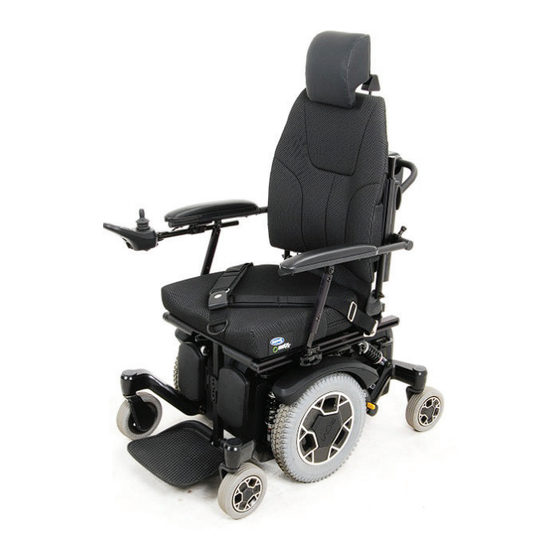
The rear power module houses the controller, fuses, and key connectors. It’s designed for quick field replacement.
Open the Rear Compartment
- Power off completely.
- Disconnect battery—critical for safety.
- Locate rear access door.
- Remove two thumb screws on either side.
- Lift door off to expose internals.
Identify Key Components
Inside, you’ll find:
– Motor cables
– Inhibit switches (e.g., seat sensors)
– Power module connectors
– Battery input terminals
All are labeled and grouped for easy service.
Slide Out the Power Module
- With battery disconnected, locate the module tray.
- Gently slide it out along its rails.
- Inspect connector pins for bent or corroded contacts.
- Replace or clean as needed.
This plug-and-play design minimizes wiring errors and cuts repair time.
Safety Rules for Module Work
- Never work on live circuits.
- Always disconnect battery first.
- Reconnect all inhibit switches after service—failure disables drive functions.
- Use only OEM replacement modules.
Warning: Bypassing safety circuits creates fall and entrapment hazards.
Troubleshoot by Symptom: Quick Reference
Use this table to diagnose common issues fast.
| Symptom | Likely Cause | Action |
|---|---|---|
| Blinking speed light + slow movement | Low battery, loose wires, controller fault | Charge battery, clean terminals, reset controller |
| No movement, flashing yellow light | Drive lockout active | Enter Mode menu, fully raise foot plates |
| Foot plate won’t move | Bad actuator, wiring break | Check power, inspect harness, test commands |
| Motor makes noise or fails | Worn motor, gear damage | Remove and inspect, check for burnt windings |
| No power, module unresponsive | Blown fuse, loose connection | Access rear, slide out module, test or replace |
Save this chart for quick field reference.
Prevent Problems: Maintenance Schedule
Regular checks prevent 80% of failures. Stick to this schedule.
Monthly Checks
- Battery charge and terminal condition
- Wheels and undercarriage for debris
- Joystick response and indicator lights
- Tire pressure and tread wear
Quarterly Service
- Tighten all fasteners (motor mounts, fender, frame)
- Lubricate foot plate actuators per manual
- Perform controller reset to clear latent errors
- Inspect wiring harnesses for wear
Annual Professional Checkup
- Full diagnostic scan with ROVI tool
- Battery capacity test
- Firmware update (if available)
- Structural inspection for cracks or stress
Skipping annual service increases breakdown risk by 3x.
Warranty and Support Info
Know your coverage before attempting repairs.
Warranty Coverage (Typical)
- Frame: 5 years
- Electronics (controller, joystick): 2 years
- Motors, batteries, power modules: 1 year
Unauthorized repairs void warranty. Use only certified technicians.
Get Help Fast
For support:
– ROVI Mobility: For manuals, parts, firmware
– National Seating and Mobility (NSM): For field service, repairs, clinical help
NSM has trained techs, loaner chairs, and next-day dispatch in many areas.
Final Safety Reminders
- Always use the correct ROVI user manual for your model.
- Never bypass safety features like drive lockout or seat sensors.
- Use only OEM parts—aftermarket components can fail dangerously.
- Avoid DIY electrical fixes without training.
Your ROVI is engineered for reliability—but only when maintained correctly. Follow these steps, and you’ll maximize uptime, safety, and performance.